
 Many of LECO’s instruments take advantage of powerful proprietary software that is constantly being improved and updated. While LECO’s Cornerstone® brand software can check for updates itself if the instrument is connected to the internet, not all instruments can be connected, for privacy or security reasons. If you ever want to check your software version, you can go to LECOSoftware.com.
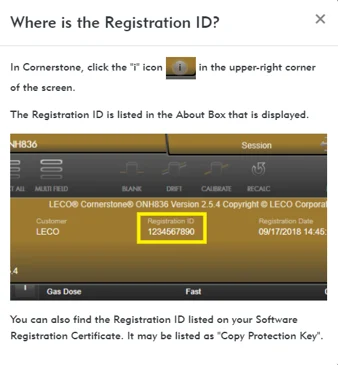
There are five sections to the LECO software website dedicated to our five major software offerings. The first, for Cornerstone, gives you access to installation files available for your Registration ID. This number is available both within your existing Cornerstone installation as well as on your Software Registration Certificate. Also available with your Cornerstone Registration ID are Product Information Bulletins (PIBs) which explain the changes made between Cornerstone versions and which instruments are affected.
 If you have Cornerstone Mobile access, the Cornerstone Mobile section can direct you to the appropriate app store for your mobile device to download or update the latest version of the mobile app.
ChromaTOF® brand software users have similar access to new software versions using your Key ID, which is also located in your software under the «i» icon in the upper-right corner of the screen or on your Software Registration Certificate.
LECO’s MX Series of mounting presses and PX Series of grinder/polishers do not have internet capabilities. To update the firmware on these instruments, you can use your model and serial number to download the latest available firmware to a USB drive, which can then be inserted into your MX or PX instrument. By selecting «Upgrade» at the bottom of the screen, the instrument will apply the latest update.
LECOSoftware.com has additional functionality for the PX Series. Grinding and polishing methods can be created and shared online using the «Manage Methods» option of the PX Series section. By creating online methods, you can both save them as files on a USB drive to be imported into your PX instrument, or you can save a link to the method to share it with a colleague.
LECOSoftware.com is just one more way that LECO strives to support our customers after the sale, with one convenient location for all of your software needs.